
For brands running paid social at any scale, AI creative tools have gone from a novelty to a genuine operational question. The category has expanded fast: image models, video generators, AI avatar tools, aggregator platforms that pull several models into one interface. The problem is knowing where to start, what's actually useful in a production context, and what's still more demo than deliverable.
The short answer: some of it works well, some of it produces extra hands where hands shouldn't be, and almost none of it is ready to run unsupervised. Here's what the testing showed.
The obvious starting point is Meta's native AI creative suite inside Ads Manager. Under Advantage+ Creative you've got background generation, image expansion across placements, text variation generation, and more recently a video tool. In the right conditions, background generation has delivered real results. Brands have reported meaningful lifts in ROAS from giving Meta's system more visual variety to work with, and that part of the argument is sound.
Spend meaningful time with the tools, though, and the limitations surface. Outputs are inconsistent. Brand guardrails are difficult to enforce. And occasionally you get something genuinely alarming. A product shot of a model in a red jumper came back from one test with a rogue extra hand growing out of the sleeve. Not ideal.
Meta's tools are improving. They're just not where most brands need them to be yet. So if you're serious about AI creative, you need to look further afield.
The number of tools available is genuinely overwhelming. The market also moves fast enough to make any fixed list unreliable. OpenAI deprecated its Sora video model recently because it was too expensive to run, despite producing some of the best output available. Recommending a definitive toolkit at any given moment feels like a fool's errand.
The more useful approach is to map tools against the creative workflow rather than evaluate them in isolation. Break the process into six stages: analysis and strategy, concept ideation, scripting, image generation, video generation, and post-production. Each stage has different requirements, and knowing where you are tells you which tools are relevant. What follows focuses on the three production stages tested against real client briefs: image generation, video generation, and UGC.
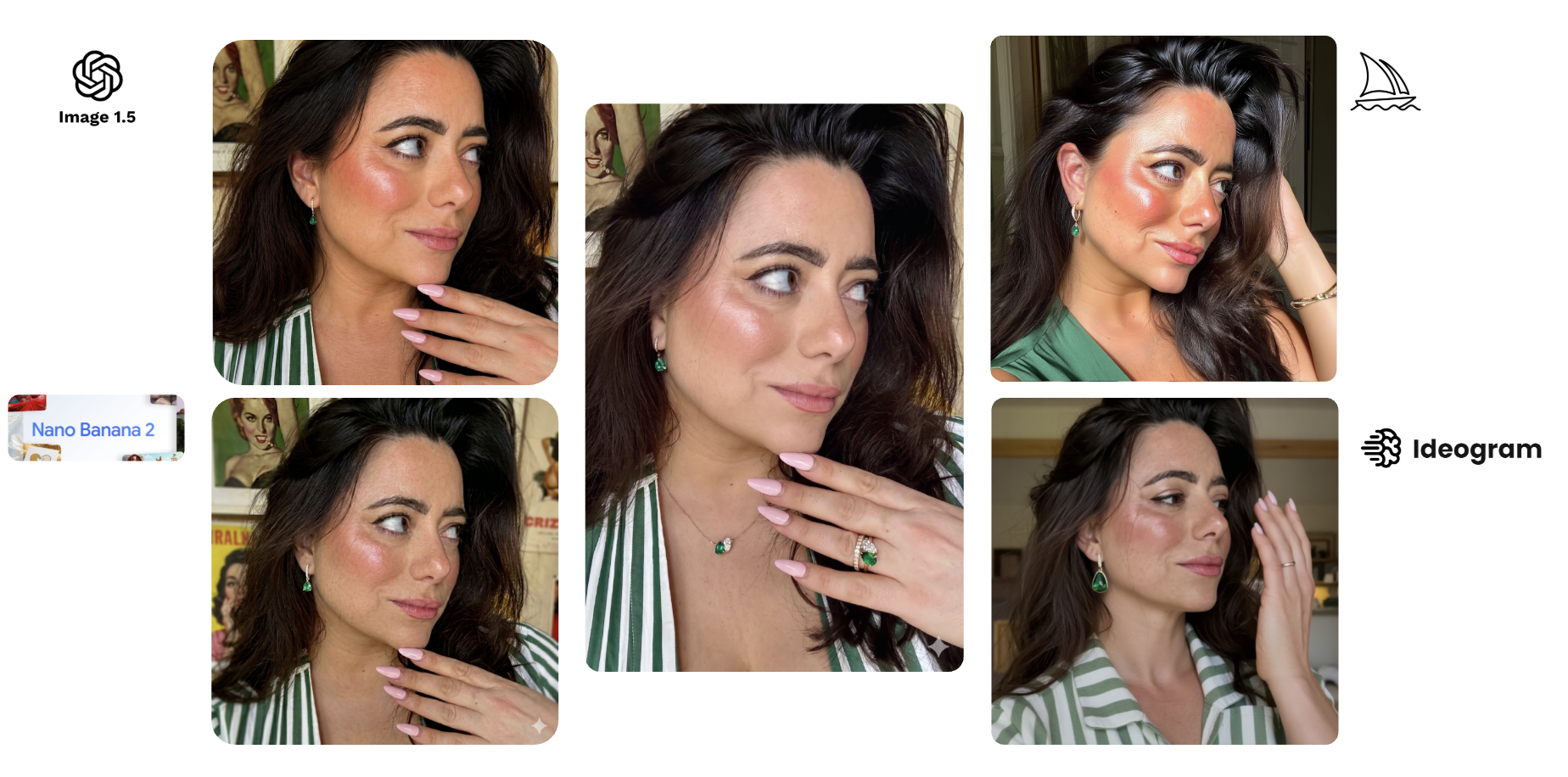
To compare fairly, the same brief went to all four tools: take an influencer shot of a model wearing emerald earrings, remove the jewellery, and place the product back on her. A representative paid social use case and a reasonable stress test for product accuracy and character consistency.
ChatGPT's image model, now on version 2.0, performed best overall. It held the character reference and kept the product detail accurate. The outputs still have an AI quality to them, but for rapid testing and conversational editing it's the most practical tool in the category. Version 2 was a meaningful step up from 1.5.
Midjourney is a different proposition. It's highly stylised and produces striking images. It also couldn't hold the product. Everything became over-stylised and disconnected from the source material. For product-based paid social, it's the wrong tool.
Nano Banana 2 is now built into Google Ads, which makes it the most accessible option at scale. Fast, photo-realistic, and strong on character consistency. On the earring test it was comparable to ChatGPT, slightly weaker on the product detail. The limitation is range: there's a recognisable Nano Banana aesthetic, and at volume it starts to show.
Ideogram sits in a different category. Its main differentiator is text rendering accuracy, which is a genuine problem for every other tool in this list. For illustrative or typographic creative it has a use case the others don't. For product photography it struggled. The earring test was a clear miss.
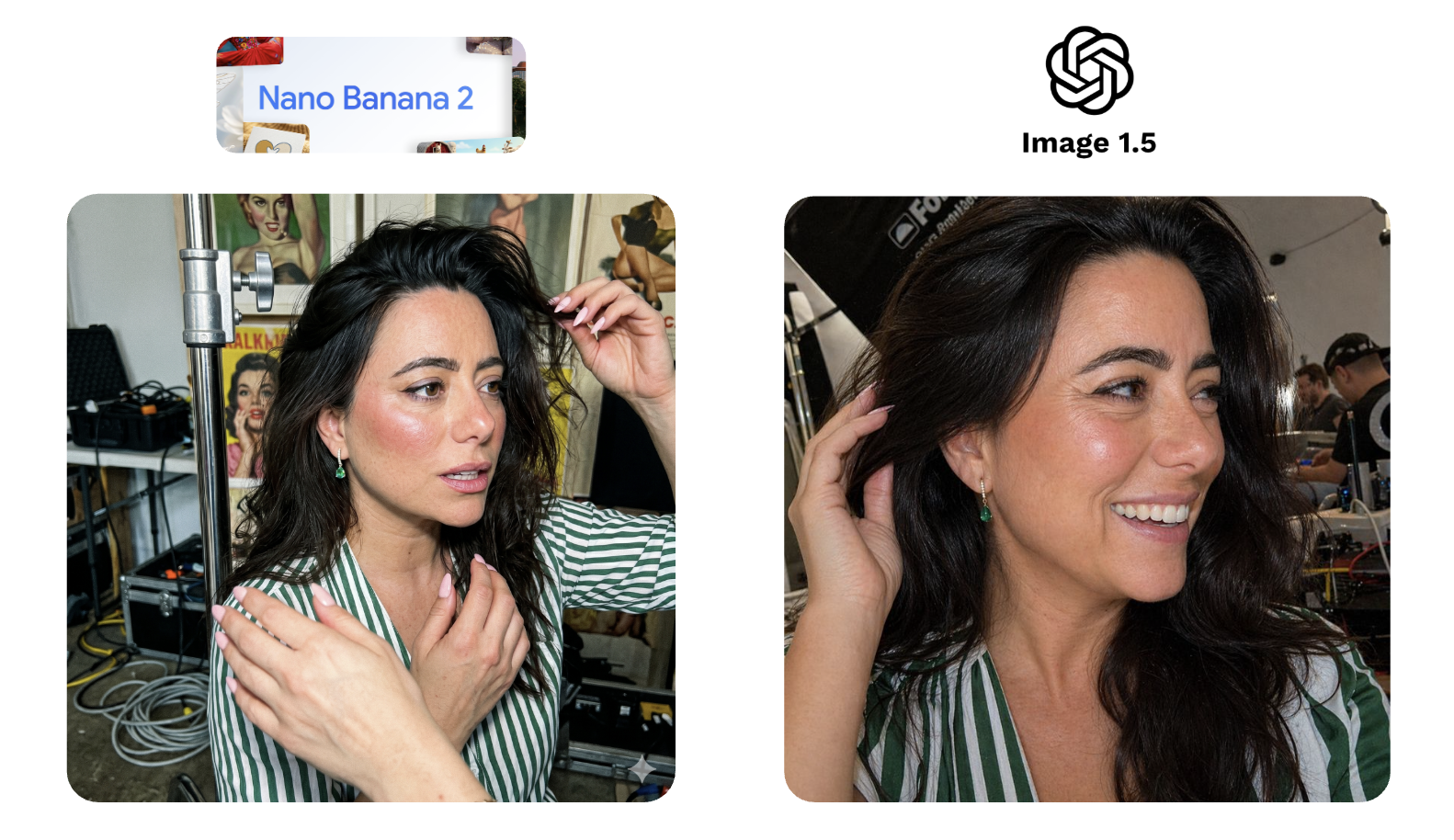
A second brief asked both ChatGPT and Nano Banana to put the same model into a UGC-style, behind-the-scenes format. Nano Banana produced an extra hand. ChatGPT's version didn't quite preserve the model's likeness, but the image itself felt like an authentic photograph. That's not nothing. Nano Banana doesn't always land that quality of realism, and in a UGC context, that matters more than character accuracy.
Video is harder than image generation. The single most useful process tip before getting into tools: generate your static image assets first and use them as references. It gives the model a better anchor and produces more consistent results.
Google's Veo is the best all-rounder and the most accessible starting point. It's free within Gemini. KlingAI supports long sequences up to 180 seconds, useful for storytelling formats, but consistency is patchy. Runway adds director-level controls: camera movements, editing tools, effects. Most other tools require re-running the full prompt to make any adjustment. Runway gives you more levers without starting from scratch.
To test Veo properly, a hero brand video for one of our clients was rebuilt from scratch: three scenes, a record player, a top-down table shot, a model raising a glass to camera. The Veo version was technically accomplished. It was also too perfect. Less emotive. Text rendering had issues. It lacked whatever it is that makes human-made content feel like it was made by a human. For high-end brand creative going into paid ads, the gap between technically correct and genuinely usable is still real, and it's particularly visible when you play both versions side by side.
That said: this will change. Probably faster than most people expect.
UGC is expensive to produce at scale. Sourcing creators, agreeing contracts, briefing them takes real time and budget. AI avatar tools, HeyGen, Arcads, Creatify, are starting to address this.
To test HeyGen, I used a basic prompt and a single character reference of myself. The output was, to put it charitably, uncanny. The script was delivered with an enthusiasm I don't personally possess. The final scene was deeply unsettling and I'd rather not revisit it.
That was a minimal input test. With multiple character references, more source footage, a tighter brief: the results improve significantly. Creatify, tested separately with better inputs, produced output that was genuinely close to usable. Seen cold, without knowing it was AI, it almost holds up.
The category is worth testing. Just don't judge it on the defaults.
For image generation: test Nano Banana 2 first. It's accessible, fast, and already inside Google Ads. Then run ChatGPT's image model alongside it. Between the two, you'll cover most production use cases in this category.
For video: start with Veo. It's free within Gemini, capable, and the right entry point for teams new to AI video.
For UGC: HeyGen has a free tier. Use it to understand what the category can and can't do before committing to anything. The gap between a basic prompt and a well-briefed output is significant enough to find out early.
For research and ideation: LLMs combined with creative intelligence tools like Motion or Atria are where the workflow starts. If you want specific prompts and use cases, get in touch.
Is AI creative ready to replace a production shoot?
For high-end brand creative, no. The video tests showed a consistent gap between technically accomplished and emotionally convincing. For lower-funnel, higher-volume creative where speed and variety matter more than production quality, the tools are closer to usable than most brands realise.
Which image generation tool should I test first?
Nano Banana 2 if you're already in Google Ads. ChatGPT's image model if product accuracy is the priority. Both are worth running in parallel.
What's the biggest mistake brands make with these tools?
Judging the category on minimal inputs. A basic prompt and a single reference image will almost always produce a mediocre result. The tools that looked worst in testing were the ones given the least to work with.

